
Find plugins with known vulnerabilities in ReDock Web
A plugin that is out of date is one thing. A plugin whose installed version has a published hole in it is another, and ReDock Web tells you which is which.
Every hour ReDock pulls the Wordfence Intelligence feed of published vulnerabilities and keeps the records for the plugins and themes your connected sites actually run. Each time a site’s state is read, every few hours, the versions it runs are compared with those records. Nothing extra is asked of the site, and there is nothing to switch on.
Vulnerability records are sourced from Wordfence Intelligence and MITRE.
Check a site
Section titled “Check a site”-
Open the site and its Security tab. The card at the top says whether anything is known against the site, and when it was last checked.
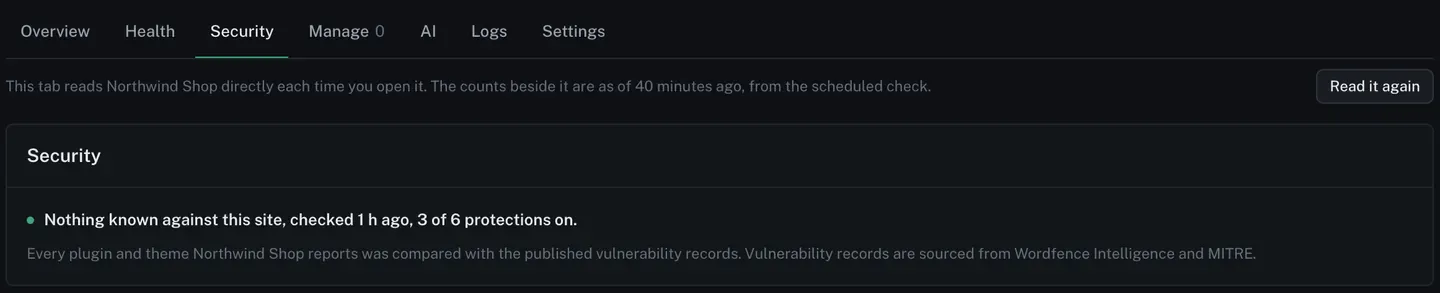
-
Open Manage, then Plugins. A plugin whose installed version falls inside a published affected range carries a red Vulnerable marker beside its update state.

The line under the list says where the records come from.
-
Read what was found on the site’s Health tab. Each vulnerable plugin or theme gets one sentence, worst first, naming the version installed, the score and the version that fixes it:
The plugin Berth Gallery 4.9.1 has a known vulnerability (CVSS 9.8); 4.9.5 fixes it. Update it from the site’s own dashboard, or queue it as a job here.
Two records against the same plugin still make one sentence, naming the version that clears both. The version named is the nearest fix on the line the site is running, so a site on 4.9.1 is told 4.9.5 even when a 5.x release fixes it too.
When nobody has published a fix yet, the sentence says so and what to do in the meantime:
The plugin Quay Slider 3.0 has a known vulnerability (CVSS 9.8) and no fix has been published yet. Deactivate it until one is, or replace it.
Themes are checked the same way.
-
Update it. Update on the plugin’s row does it on this site. For many sites at once, queue a job, or a safe update that looks at each site before and after.
Where else it shows
Section titled “Where else it shows”The same sentences appear wherever ReDock prints a site’s state:
- Needs attention on the Overview page, and the site’s state on All sites;
- the site’s Health tab;
- the alert email;
- the monthly report, which names them for each site, and its JSON export.
Each of those carries the line about where the records come from, once. A site with more than ten vulnerable plugins and themes lists the ten worst and counts the rest, so an email stays readable.
When ReDock could not check
Section titled “When ReDock could not check”“We found nothing” and “we could not look” are opposite statements, and ReDock never prints the first when the second is true.
A site whose answer did not carry its full plugin list, or that did not say what it has installed, is marked as needing attention with a sentence of its own:
ReDock Web could not check this site against the vulnerability database: the site’s answer was too big to carry the list of its 412 plugins, so only the counts arrived. That is not the same as finding nothing.
Whatever part of the list did arrive is still compared, and a vulnerable plugin in it is still named beside that sentence. A site with more plugins than one answer can carry stays in this state, because the rest of its list still cannot be read.
A plugin that no published record mentions is simply not mentioned. ReDock never calls it safe.
Before rolling a plugin back
Section titled “Before rolling a plugin back”When you roll a plugin back to a version, the version picker marks every version that has a published record, and the confirm names the vulnerability before anything changes on the site.
Open ReDock Web, or create an account if you do not have one yet.